

Email templates
A template library that already looks like you.
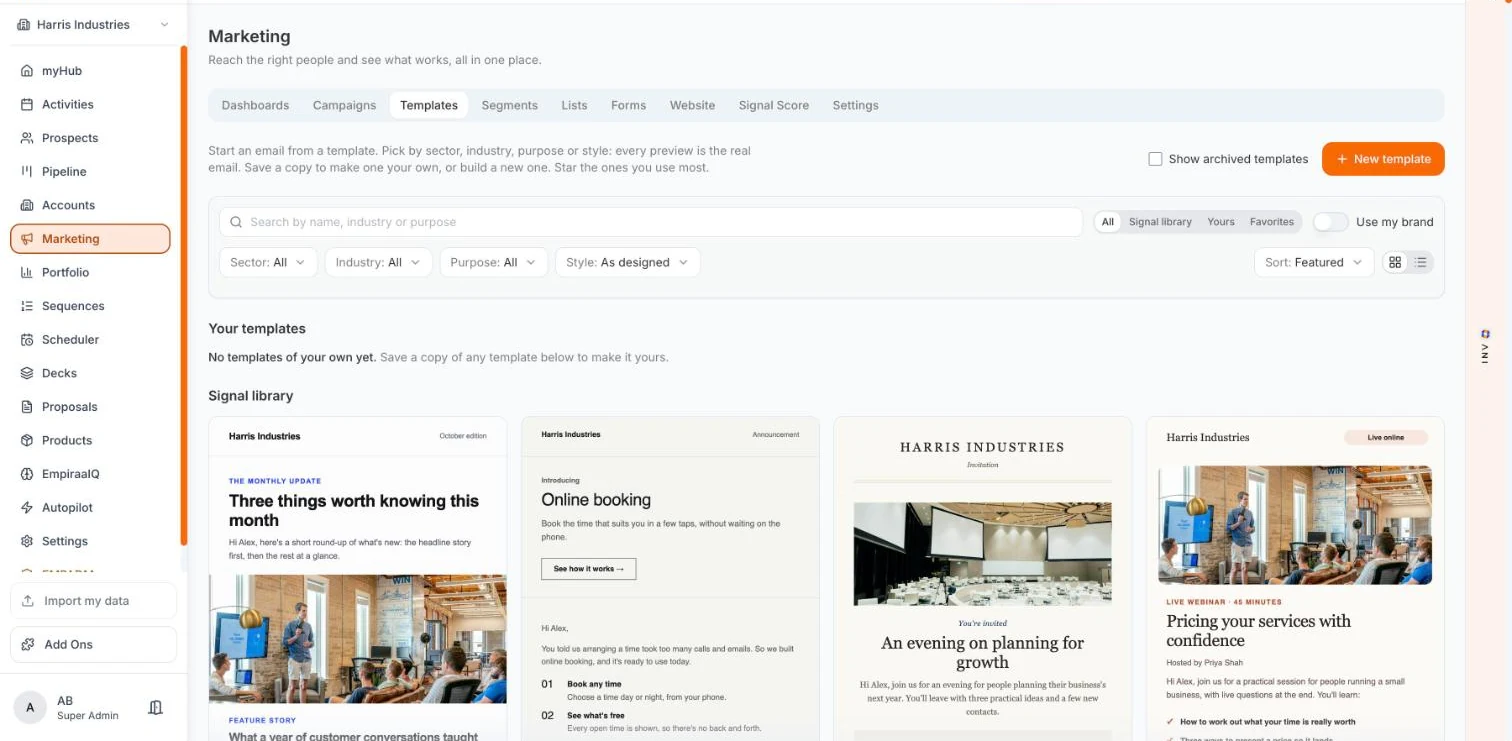
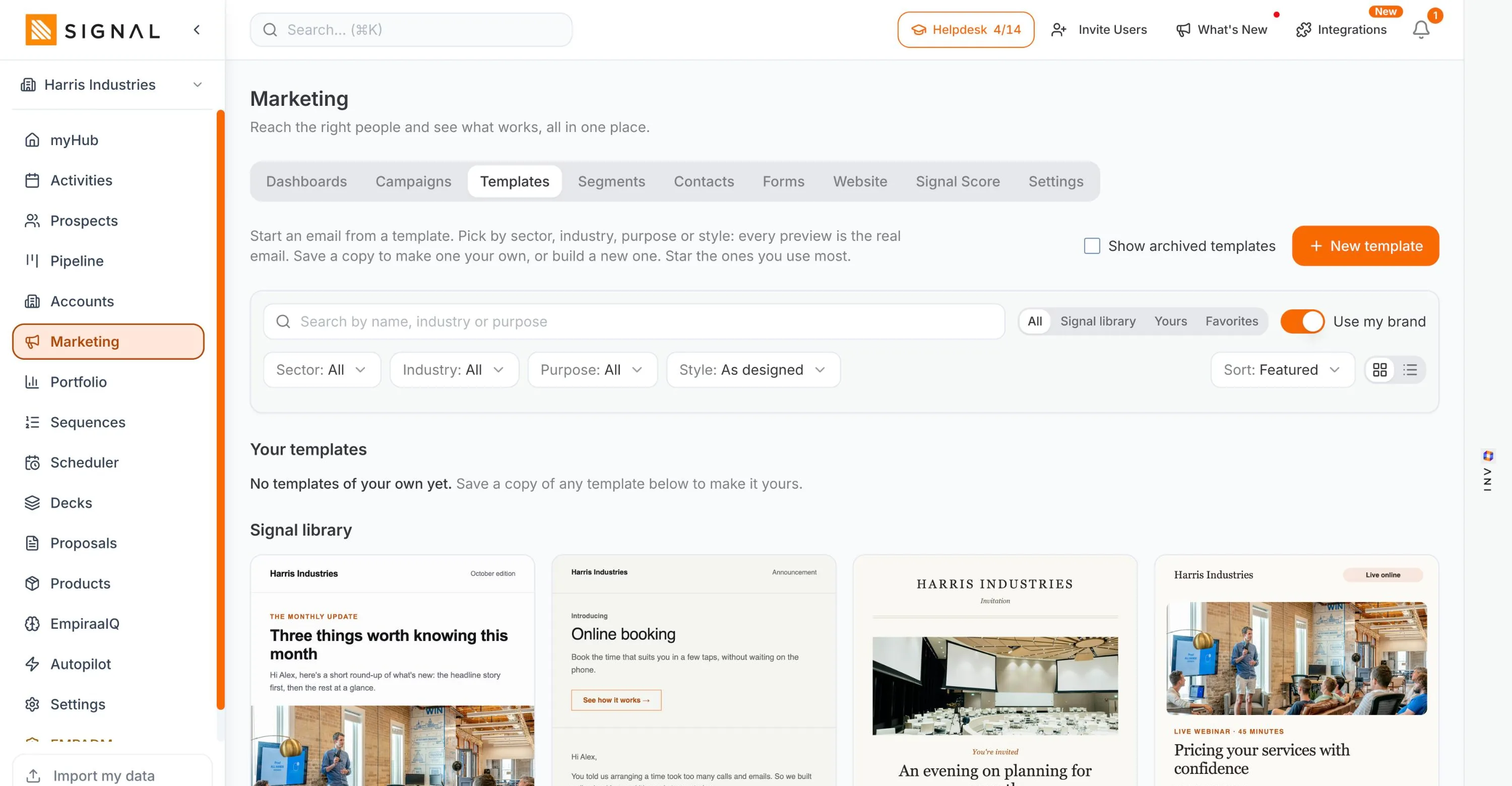
Around a hundred templates across thirty industries, from an EOFY checklist for an accounting practice to a defect report for a cybersecurity firm. Turn on Use my brand and every one of them redraws in your colours, fonts and logo. The starting point is yours before you have written a word.
14 days free. No credit card.
- 14 days free
- No credit card
- Unlimited users
Why template libraries disappoint
The library is somebody else’s design, and undoing it is the work.
Three things go wrong with a stock library, and all three end with a designer or a blank page.
What usually happens
It looks like the vendor, not like you
Stock colours, stock type, a logo slot. Recognisable as a template to anyone who has received one, which is everybody, and the first thing a brand-conscious business rejects.
Restyling is per template
Change the colours on the newsletter and you have changed the newsletter. Next month you want the event invite, and you do it again. The cost is small each time and never stops.
Nothing fits your industry
A generic newsletter and a generic promotion. Useful to nobody in particular, so the specific email you actually need gets built from scratch anyway.
How it works
Pick by job, then make it yours.
The library
Filter by the job, not the look
Sector, industry, purpose and style. Purpose is the useful one: newsletter, launch, event, promotion, reminder, renewal, lead magnet, case study, re-engagement, review, referral, follow-up, welcome. You are picking the email you need to send rather than scrolling pictures.- Around thirty industries, named rather than implied
- Purpose covers the thirteen jobs a marketing email does
- Every preview is the real email, not a thumbnail
Use my brand redraws all of it
One toggle, and the whole Signal library renders in your Branding Kit: your colours, your fonts, your logo. Not one template restyled and saved, the library. Your own saved templates keep the design you gave them, so turning it on cannot overwrite your work.- The entire library, in one switch
- Your own templates keep their design
- Style can also be set per template when you want it
Save a copy to make it yours
Any library template becomes one of yours with Save a copy, which is when you can change its structure rather than only its skin. Star the ones you come back to, and the library sorts itself around how you actually work.- Yours sits beside the Signal library, not buried in it
- Favourites for the four you use every month
- Archive what you have stopped using, without deleting it
And ANI writes the thing
The builder has Content, Sections, Style and ANI as tabs. Ask ANI for the email and it drafts into the blocks, reading your ideal customer profile rather than a blank prompt box. The template gives you the shape and the brand. ANI gives you the first draft of the words. You keep the final say on both.Every plan has every feature. The difference between them is volume.
Explore Signal freeWhat the industry templates cover
Named industries, with the emails that industry actually sends.
A sample rather than the full list, chosen to show how specific they get.
A sample of the library
Accounting and advisory
EOFY checklist as a lead magnet, and a client feedback request.
Trades and home services
Quote follow-up, review request and a seasonal special.
Cybersecurity
A threat report lead magnet and a live briefing invitation.
Property and real estate
New listing, open home invite and a suburb report.
SaaS and tech
Feature launch, welcome and onboarding, and a trial ending nudge.
Recruitment and staffing
Candidate shortlist and a salary guide.
Related
Keep exploring Signal.
Related pages

Questions
Questions about the template library
How many email templates does Signal include?
Around a hundred, across roughly thirty named industries, filtered by sector, industry, purpose and style. The library grows, so the page avoids a precise count that would quietly go stale.
Can I make the templates match my brand?
Yes, and in one step rather than one template at a time. Use my brand renders the entire Signal library in your Branding Kit colours, fonts and logo. Templates you have saved as your own keep the design you gave them, so turning it on never overwrites your work.
Are the templates industry-specific or generic?
Both. There are any-industry templates for the common jobs, and named-industry ones that are genuinely specific: an EOFY checklist for accounting and advisory, an AS-style service reminder for industrial equipment, a suburb report for real estate, a threat report for cybersecurity.
Can I build a template from scratch?
Yes. New template starts from an empty email, and the builder works in blocks: text, title, image, logo, button, list and checklist, with your footer already in place. You can also save a copy of any library template and change its structure rather than only its colours.
Does ANI help write the email?
Yes, and from inside the builder rather than a separate panel. ANI is a tab next to Content, Sections and Style, it drafts into the blocks, and it reads your ideal customer profile so the draft knows who it is for. You edit before anything sends.
What do the sample emails on this page show?
A demo workspace with an invented brand. The company name, the offers and the people in those previews are all made up, and no real customer appears on any screen on this site.

Wondering how it would look as you? Ask ANI and get a straight answer.
See the library in your own colours.
14 days free, no credit card. Set the Branding Kit once and the whole library follows.