

Interactive walkthrough
See your strategy become action. Explore GPS for your business.
Build a plan, run the week and see what is moving. Explore real GPS screens through the workflow you need or the role you lead.
No sign-up. Real screens from a working plan.
- Set up with your plan
- Unlimited users
- 30-day pilot
8 journeys
- Build a plan with ANI or your existing strategy
- Keep goals, owners and weekly actions connected
- Turn progress into leadership reports
- Explore connected AI and MCP workflows
The walkthrough
Start where you sit.
The walkthrough is running below. Switch to the journey for your seat, step through it yourself, or press Play and watch.
Real product screens · guided walkthrough
The full tourAnyone new to Empiraa GPS
Plan, run, report, improve and connect, in order.
Step 1 of 41
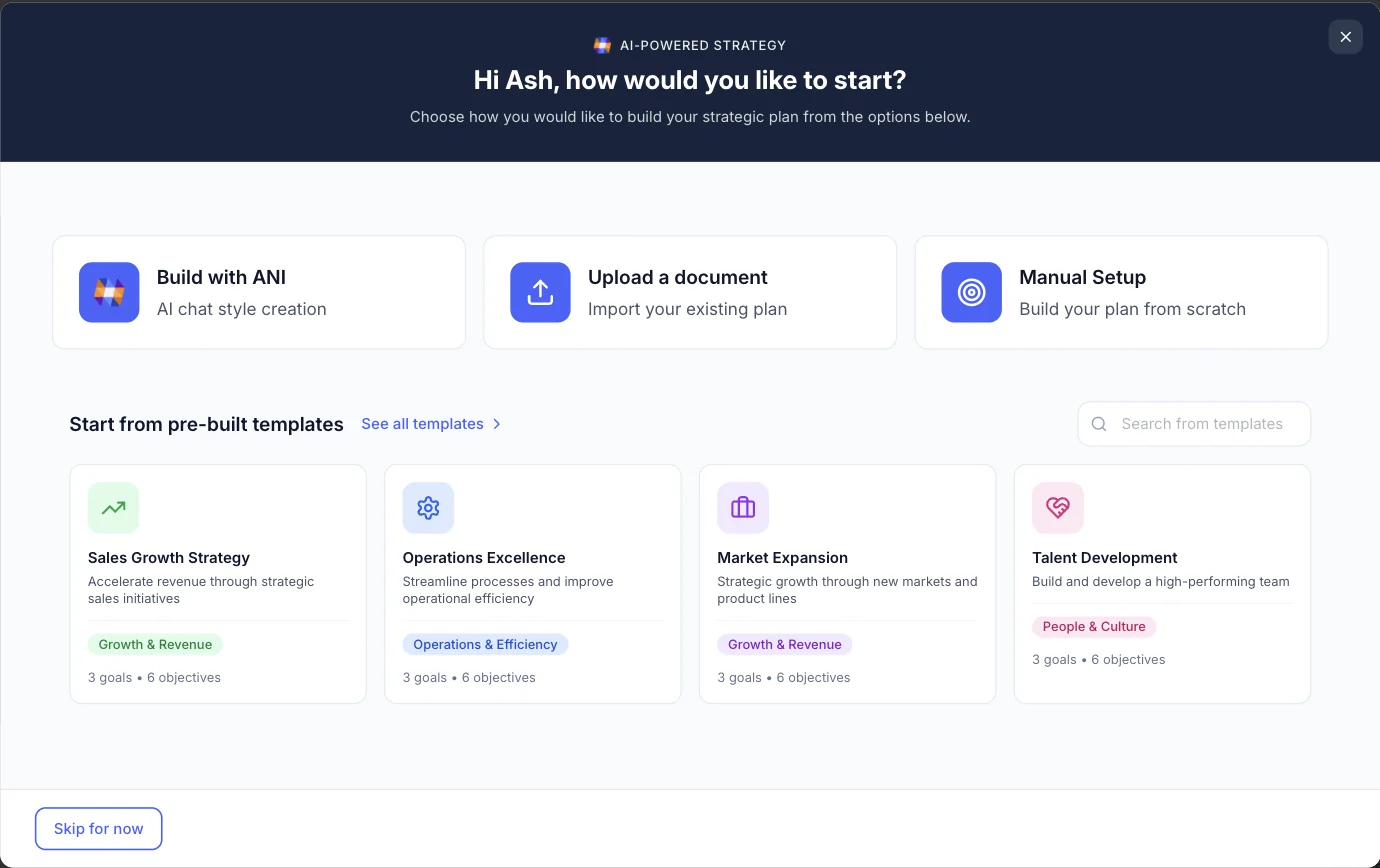
1Start from the plan you have
Build it with ANI
Answer a few questions and ANI drafts the goals, objectives and actions for you to edit.
Choose a hotspot or use Next and Back to follow the workflow.
The journeys
Choose your role. Or the work you need to do.
Explore planning, weekly delivery or connected AI, or follow the journey for your leadership role. Each route shows the screens in the order you would use them.
Pick a route
Anyone new to Empiraa GPS
The full tour
Plan, run, report, improve and connect, in order.
11 screens41 stepsabout 6 min
Start this route- myPlan / new planStart from the plan you have
- myPlan / Strategy One PagerThe whole strategy on one page
- myHubEveryone opens on their part of the plan
- An objective / OverviewEvery measure, against where it should be today
- A meeting / My check-inEveryone arrives ready
- A meeting / liveThe meeting, running
- myPlan / TimelineThe year, against today
- myPlan / Exec ReportThe report writes itself
- ANI insightsANI flags what needs action
- Improvement Plan / BoardIdeas from the front line
- Settings / IntegrationsYour numbers, arriving on their own
CEO or MD
Monday morning to the board meeting
Know where the plan stands without asking anyone.
6 screens20 stepsabout 4 min
Start this route- myHubEveryone opens on their part of the plan
- myPlan / Strategy One PagerThe whole strategy on one page
- myPlan / TimelineThe year, against today
- ANI insightsANI flags what needs action
- myBusiness / Ask ANIANI checks the load
- Board reportWhat the board actually reads
COO or GM
The operating rhythm
A weekly cycle that ends in decisions, not updates.
6 screens23 stepsabout 5 min
Start this route- myBusiness / Accountability ChartWho owns what, not who reports to whom
- An objective / OverviewEvery measure, against where it should be today
- A meeting / My check-inEveryone arrives ready
- A meeting / liveThe meeting, running
- A meeting / SummaryThe write-up is already done
- Improvement Plan / BoardIdeas from the front line
CFO
From the numbers to the pack
Measures that update themselves, and variance you can defend.
6 screens22 stepsabout 5 min
Start this route- An objective / OverviewEvery measure, against where it should be today
- An objective / ForecastWhere this lands if nothing changes
- An objective / IntegrationsMap a measure to the source
- myPlan / TimelineThe year, against today
- myPlan / Exec ReportThe report writes itself
- Board report / chartsThe gap at a glance
Owner or board
What you get before the meeting
The plan, the gaps and the asks, without waiting for a pack.
6 screens21 stepsabout 4 min
Start this route- myPlan / Strategy One PagerThe whole strategy on one page
- myPlan / TimelineThe year, against today
- Board reportWhat the board actually reads
- Board report / chartsThe gap at a glance
- ANI insightsANI flags what needs action
- myBusiness / Accountability ChartWho owns what, not who reports to whom
Business owners and team leaders
Turn ambition into a working plan
Start with ANI or your existing strategy, then turn it into priorities and owners.
6 screens20 stepsabout 4 min
Start this route- myPlan / new planStart from the plan you have
- myPlan / build with ANIANI asks what a strategist would
- myPlan / Vision & CultureThe thinking behind the plan
- myPlan / Strategy One PagerThe whole strategy on one page
- myPlan / Next 90 DaysAgree the quarter as a team
- myBusiness / Accountability ChartWho owns what, not who reports to whom
Department heads and delivery teams
Make the weekly meeting move work
Check progress, surface blockers and leave with decisions and owned actions.
7 screens26 stepsabout 5 min
Start this route- myHubEveryone opens on their part of the plan
- An objective / OverviewEvery measure, against where it should be today
- A meeting / My check-inEveryone arrives ready
- A meeting / AgendaAn hour that is planned, not hoped for
- A meeting / liveThe meeting, running
- A meeting / IssuesWork the real issues first
- A meeting / SummaryThe write-up is already done
Leaders connecting their business tools
Ask, review and act with connected AI
See real examples of finding overdue work, updating measures and reviewing a leadership scorecard.
5 screens11 stepsabout 3 min
Start this route- Settings / IntegrationsYour numbers, arriving on their own
- Connected AI / overdue goalsFind the work that needs attention
- Connected AI / KPI check-inKeep measures moving with the work
- Connected AI / actionsTurn the conversation into follow-through
- Connected AI / leadership scorecardGive the next review a clear starting point
By stage
Every screen in the walkthrough.
31 screens across five stages. The full tour walks 11 of them; the role routes pick the ones that seat lives in.
The five stages
- 01
Plan
Bring the strategy in, put it on one page and agree the quarter.
6 screens- myPlan / new planStart from the plan you have
- myPlan / build with ANIANI asks what a strategist would
- myPlan / Strategy One PagerThe whole strategy on one page
- myPlan / Vision & CultureThe thinking behind the plan
- myPlan / Next 90 DaysAgree the quarter as a team
- myBusiness / Your StoryHow the business got here
- 02
Run
Owners, check-ins, and meetings that end in decisions.
10 screens- myHubEveryone opens on their part of the plan
- myBusiness / Accountability ChartWho owns what, not who reports to whom
- myBusiness / Ask ANIANI checks the load
- An objective / OverviewEvery measure, against where it should be today
- A meeting / My check-inEveryone arrives ready
- A meeting / AgendaAn hour that is planned, not hoped for
- A meeting / liveThe meeting, running
- A meeting / IssuesWork the real issues first
- A meeting / SummaryThe write-up is already done
- MeetingsWhat your leaders spend on meetings
- 03
Report
The year against today, forecasts, and reports from live data.
5 screens- An objective / ForecastWhere this lands if nothing changes
- myPlan / TimelineThe year, against today
- myPlan / Exec ReportThe report writes itself
- Board reportWhat the board actually reads
- Board report / chartsThe gap at a glance
- 04
Improve
ANI insights and ideas from across the business.
4 screens- ANI insightsANI flags what needs action
- ANI panelANI sits beside every screen
- Improvement Plan / BoardIdeas from the front line
- Improvement Plan / DashboardProof that ideas go somewhere
- 05
Connect
Your finance, sales and calendar systems, feeding the plan.
6 screens- Settings / IntegrationsYour numbers, arriving on their own
- An objective / IntegrationsMap a measure to the source
- Connected AI / overdue goalsFind the work that needs attention
- Connected AI / KPI check-inKeep measures moving with the work
- Connected AI / actionsTurn the conversation into follow-through
- Connected AI / leadership scorecardGive the next review a clear starting point
Questions
Walkthrough questions, answered.
Are these real Empiraa GPS screens?
The walkthrough uses real GPS product screens and captured connected AI workflows with demo business data. It is a guided screenshot tour, not a live account.
Which journey should I take?
Pick the one that matches your seat. A CEO or MD sees the week from Monday morning to the board meeting, a COO or GM sees the operating rhythm, a CFO follows a measure from its source system into the pack, and an owner or board member sees what lands before a meeting. You can also follow focused planning, weekly delivery and MCP workflows. The full tour covers the platform end to end.
How long does it take?
Focused workflows run about three to five minutes, role journeys about four to five, and the full tour about six. You can click through at your own pace, press Play to have it advance for you, or jump straight to any screen.
Can we try GPS with our own plan?
Yes. Choose Start for Free to create your GPS account. See the pricing page for current plans, 30-day pilot terms and implementation options. See how pricing and pilots work.
Can I explore without signing up?
Yes. Every journey on this page is open to explore. Choose numbered hotspots, jump between screens, or use Play. You only need an account when you want to work on your own plan.
Does the walkthrough cover every feature?
It covers the screens a leadership team uses most. The features page goes through every area of the app, tab by tab. See all features.

Question not answered here? Ask ANI and get a straight answer.
Now see it on a plan like yours.
Start for free and bring your goals, people and progress into GPS.