

Empiraa GPS for Professional Services
Turn your expertise into recurring revenue.
Empiraa GPS is the system a professional services practice runs on: a workspace for every client's plan and their work, and myPortal above them all for your clients, meetings, documents, templates, branding, time and margin.
30-day free pilot · Card required · Cancel any time
Real GPS screens. A separate workspace for every client.
What it is
Everything your practice runs on, in one place.
Each client gets a workspace of their own: their plan, their objectives, their actions and their meetings, in your branding rather than ours. myPortal sits above all of them, so you can see every client at once, who needs you this week, where your hours went and what each one earned.
What is in the 90 seconds
The spreadsheets, inboxes and shared drives a practice actually runs on, and the single place they collapse into.
GPS connecting to the tools already in the practice, and a new client set up and invoiced before day one rather than in the week after it.
The timeline with goals, objectives and the dates against them, in a workspace of the client’s own rather than a document they were emailed once.
Objectives broken into actions with owners and dates, time logged against the goal it moves rather than a job code, and over-servicing named while there is still something to be done about it.
Scheduled check-ins going out and coming back on their own, and the client conversation happening against the goal it is about instead of in a thread nobody can find.
Progress moving as the work moves it, what the engagement is worth in time and money, and one snapshot carrying the client’s health, plan, margin and hours together.
The practice view across every client account at once: who needs attention, where the hours went and what each one earned.
Your next chapter
Where do you want to take your services?
Launching something new or growing an established practice? Choose your starting point to see how GPS supports the way you work.

Build a service around the expertise you already have.
Turn your knowledge into a clear offer, a shared client plan and a reason for the next review.
Three steps. See each one in GPS.
Shape the plan with ANI01 / 03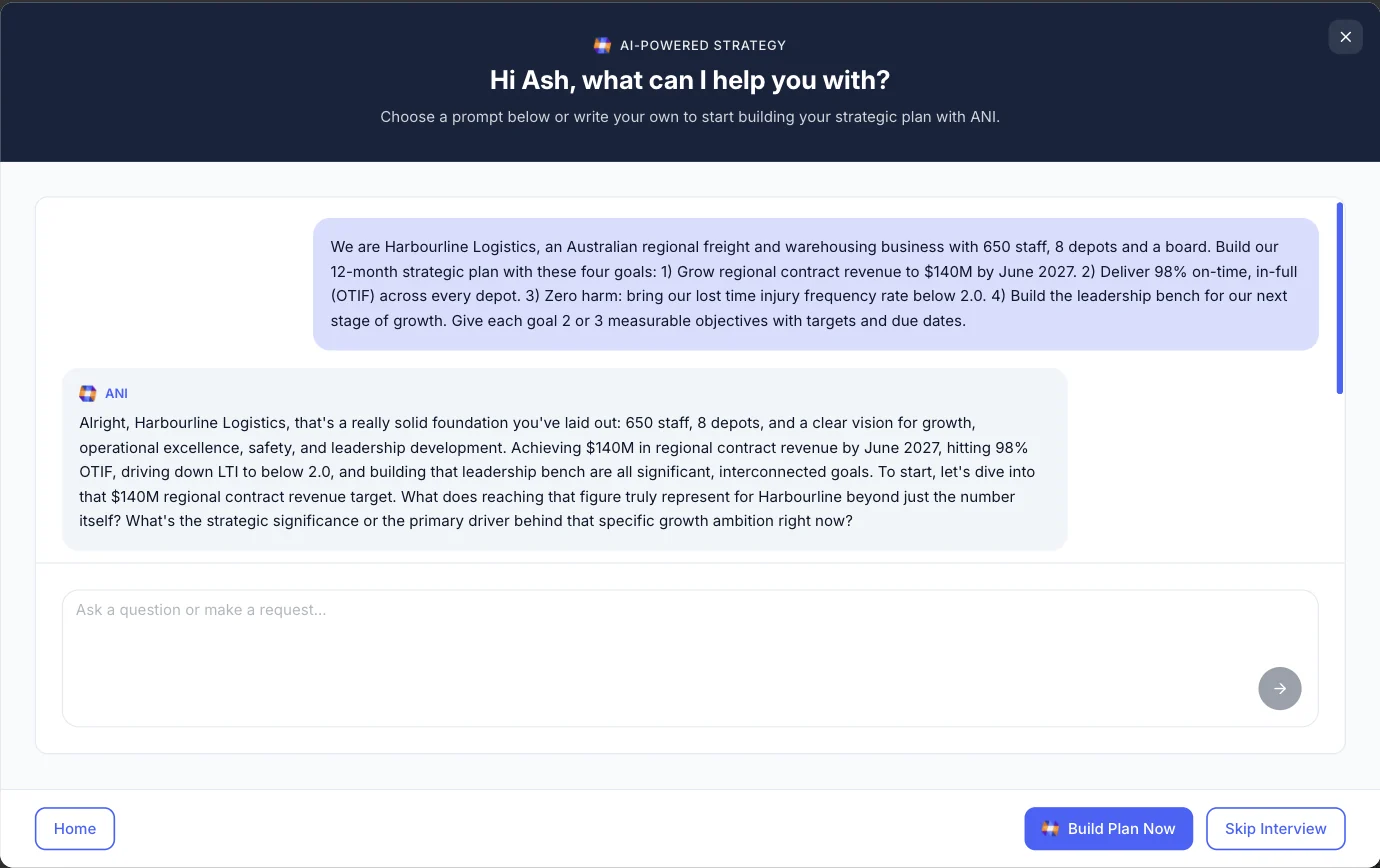
ANI asks about the business and helps shape the goals. Your expertise guides the plan.
Real GPS screen · Sample client workspaceStarting a service or growing an established practice?
Build a service around the expertise you already have.
Turn your knowledge into a clear offer, a shared client plan and a reason for the next review.
- Start with a plan, not a blank page. Use 220 templates and ANI to shape a starting point. Add your judgement before sharing it.
- Give your offer a clear shape. Agree outcomes, responsibilities and a review rhythm in the client workspace.
- Create a reason for the next conversation. Use actions, check-ins and progress to make each follow-up valuable.
For an accountant entering advisory: turn the priorities behind the numbers into a client plan, agree measurable objectives and use monthly reviews to guide the next decisions.
Make your delivery repeatable. Keep your expertise personal.
Bring your method, client progress and review rhythm together. Support more engagements with a consistent way to deliver.
- Reuse the method that works. Reuse your plans and agendas, then tailor them to each engagement.
- See the client work in one place. Oversee separate client workspaces in myPortal and see where your attention is needed.
- Make your ongoing value visible. Show what has moved, what needs support and what the next review should focus on.
For an established consultancy or coaching practice: reuse your delivery framework, keep client commitments visible between sessions and arrive at reviews with the context already together.
GPS + the AI assistant you use
Arrive at the next client conversation prepared.
Ask Claude or ChatGPT for a client brief, outstanding actions or a draft plan. Empiraa MCP is the connection that lets your assistant work with GPS, within your permissions.

 Claudeor
 ChatGPT93 tools. Your permissions.
CHOOSE THE WORK. SEE THE RESULT.
Interactive showcase · 02 / 0501 / You ask
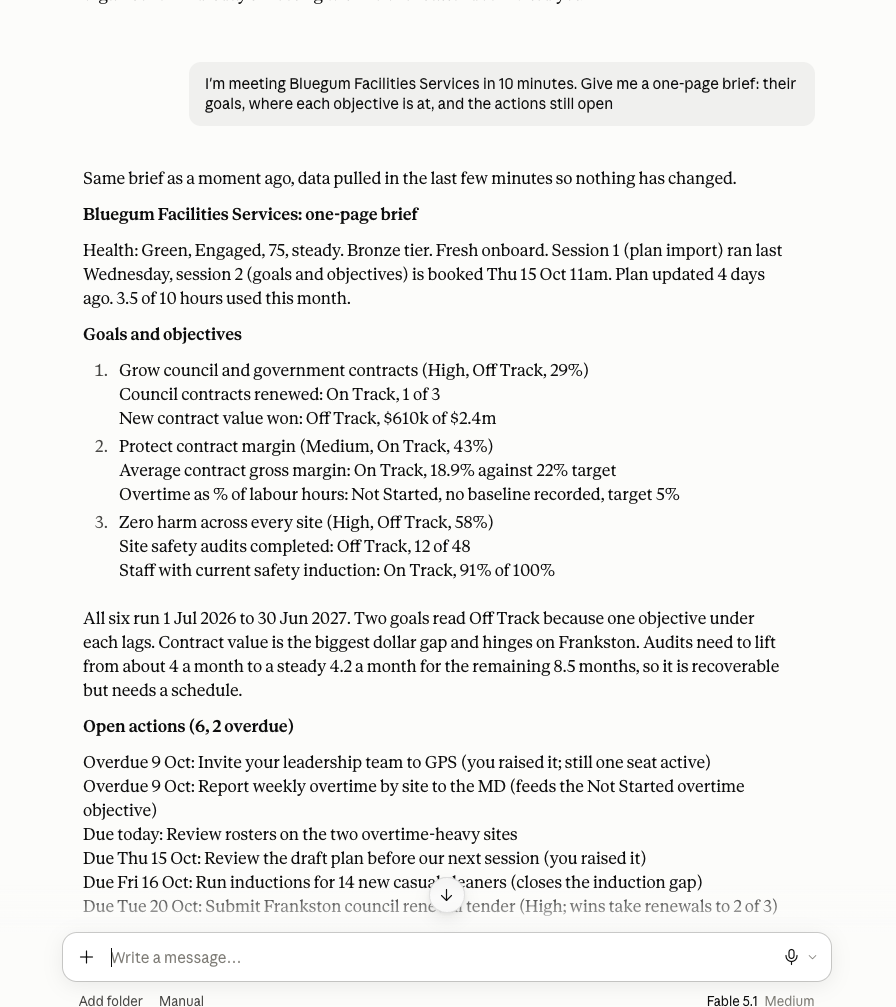
Brief me on this client before our next meeting.
02 / GPS puts it to work
Arrive ready to do the valuable work.
Ask for the health trend, open actions, notes, last check-in and next meeting in one brief. Spend the session on decisions, rather than reconstructing the last month.
- Recent notes and check-ins
- Open actions and health trend
- Context for the next conversation
Connect the tools behind your client workExplore apps +
Bring your client context together.
Connect the numbers, notes and updates that inform your work. Choose an app to see where it fits.
Xero + your client work
Connect financial measures to client objectives so the plan reflects the numbers. Ask your assistant to help interpret the progress.
Try asking “Which client financial objectives need attention before this month’s review?”
Explore the GPS integration →GPS integrations connect supported data to your plan. Granola and Slack examples require their own connections in your AI assistant; availability depends on your account and permissions.
Your accounting stack. Your client workflow.
Bring client financials, practice work and meeting context into the same AI conversation as Empiraa GPS. Explore the MCP options for the tools your practice uses.
- Client financialsXero MCP · developer setup
 Xero
Xero - Customers, bills and accounting actionsVia Zapier MCP
 QuickBooks Online
 - Client data and financial insightsDext AI Connector · Practice Advanced beta
 Dext
Dext - Practice contactsVia Zapier MCP
 Karbon
 - Client documents, jobs and tasksVia Zapier MCP
 FYI
FYI - Client accounting dataVia CData Connect AI
 MYOB AccountRight
 - Client meeting notesGranola MCP
 Granola
 - Proposals, billing and engagementsIgnition MCP
 Ignition
 - Client email and calendarVia Zapier MCP
 Microsoft Outlook
 - Client files and documentsVia Zapier MCP
 Google Drive
 - Client spreadsheets and figuresVia Zapier MCP
 Microsoft Excel
 - Knowledge, notes and playbooksNotion MCP
 Notion
Connect each app separately to a compatible AI assistant. Developer setup, beta access or an additional provider subscription may be required, as indicated above. Available actions depend on the connector and your permissions; these are MCP pathways alongside GPS, not direct Empiraa integrations. Provider documentation checked 14 October 2026.
What can you do with GPS through MCP?
Review your clients
Bring back client workspaces ranked by engagement health, with the reason each needs attention. Decide where your expertise will have the most impact.
Prepare a meeting
Ask for the health trend, open actions, notes, last check-in and next meeting in one brief. Spend the session on decisions, rather than reconstructing the last month.
See your actions
Pull the actions you own into one conversation, grouped by client, with due dates and overdue work visible.
Manage capacity
Compare allocated and logged hours by client. Your assistant can also help record time and approve weeks when your permissions allow it.
Draft a client plan
Ask for a structured draft, refine the measures and settle the details before asking your assistant to create it in GPS. You can also preview and apply strategy templates.
How permissions and changes work
You ask. GPS does the work.
Nothing happens unprompted. Each organisation chooses view-only or change access, and your assistant works within your existing permissions.
Control stays with your team.
Bulk changes are previewed before saving. AI changes are logged, most can be undone for seven days, and protective limits can pause the connection for the owner to resume.
Bring your other tools along.
Use notes from Granola, figures from Xero or updates from Slack in the same conversation when those tools are connected to your assistant.
Try the interactive demo
A plan your clients keep putting into action.
Choose a workflow: launch a service, deliver an engagement, run client reviews or manage your practice through myPortal. Follow the hotspots to see what happens next.
From check-in to conversationKeep clients engaged
Explore actual check-in questions, answers, upcoming meetings and client conversations.
Step 1 of 8
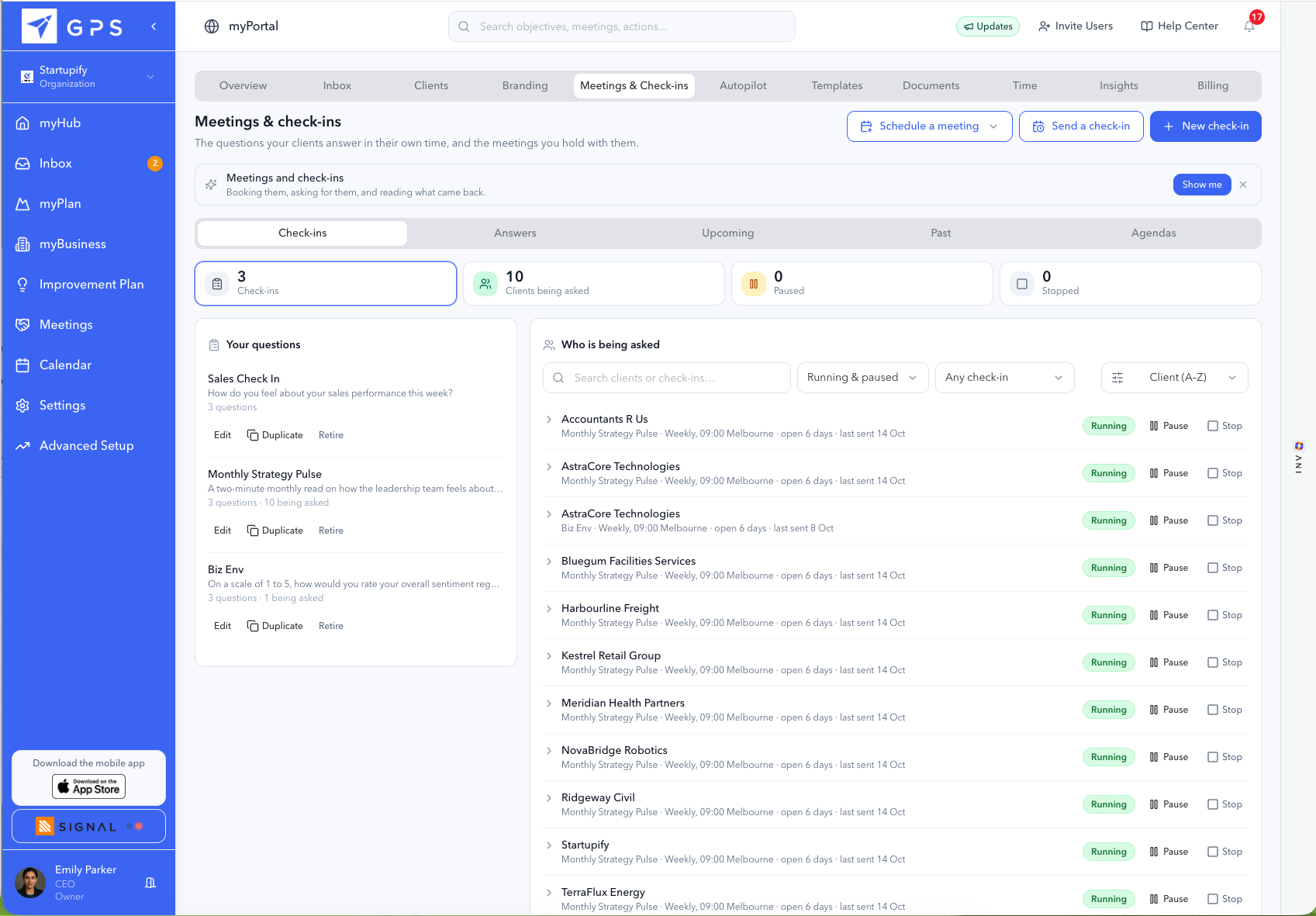
1Keep clients engaged between sessions.
Review the check-in rhythm.
See the questions and client assignments behind each check-in.
Choose a hotspot or use Next and Back to follow the workflow.
Actual GPS and myPortal product captures. Explore with the hotspots or Next button. Your accounting and practice-management systems retain their own roles.
 YOUR EXPERTISE, WITH A HEAD START
Turn the client conversation into a working plan.
ANI is the AI strategist built into GPS. Give it the client’s context, work through its questions and refine the proposed plan. Your expertise guides what you share.
- Start from what you already know about the client.
- Shape objectives and actions with your judgement.
- Keep the plan relevant as the engagement develops.
Real GPS screen: ANI helps prepare a plan for a sample client. You guide and review the output.
myPortal · The view across your clients
Run your client services from one place.
myPortal sits above your separate client workspaces. Explore every page to see how it helps you organise delivery, support your team and keep your clients moving.
myPortal10 pages · Choose one to exploreKnow which client needs you next.
See client engagement and progress together. Start your week with the conversations where your expertise can make a difference.
Focus your attention before a client slips further behind.
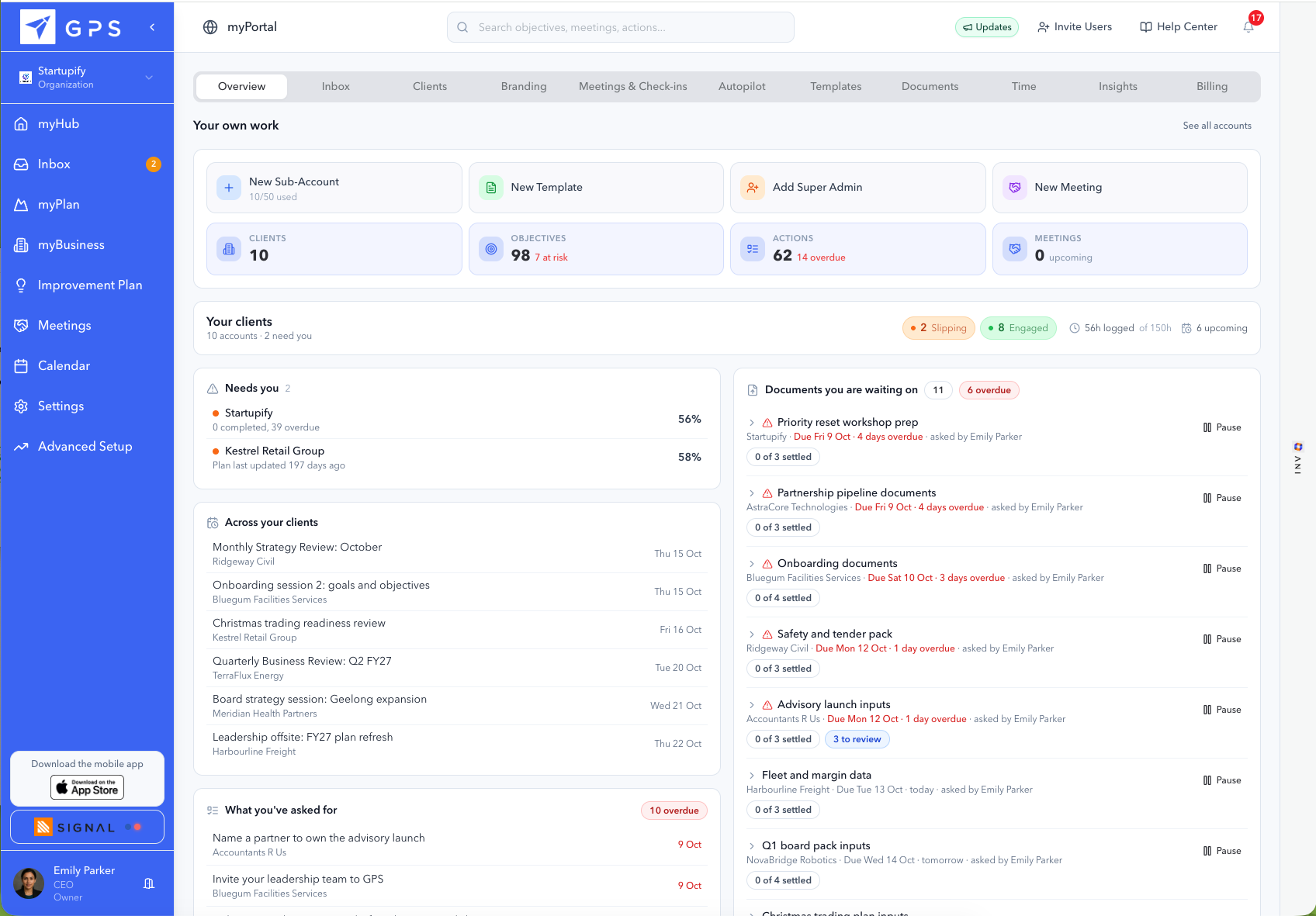
Actual myPortal product capture.
- Review engagement across clients
- Spot off-track plans
- See unallocated relationships
What can you manage in myPortal?
- Client overview
- See engagement and progress across your client accounts so you can prioritise your next conversation.
- Inbox
- Keep client conversations and requested-document context alongside the delivery work.
- Client accounts
- Give each client a separate workspace with its own plan, users and responsible consultant.
- Branding
- Apply your logo, colours and typeface. Clients continue to sign in through Empiraa.
- Meetings and check-ins
- Collect updates and blockers, run reusable agendas and turn decisions into owned actions.
- ANI Autopilot
- Set communication preferences and guardrails across your practice, with client-specific overrides.
- Templates
- Start from 220 ready-made plans or reuse your own plans, agendas and document checklists.
- Documents
- Track requests, missing information and overdue items by client.
- Time and capacity
- Log delivery time and compare allocations and meetings across consultants, looking twelve weeks ahead.
- Insights
- Review progress, engagement and risk across your client book.
Explore myPortal for client delivery · Compare Professional Services plans
Your accounting and practice-management tools retain their own roles. Retainer hours support delivery reviews; GPS does not invoice your clients.
Everything in myPortal
A strategy platform grew into the system the practice runs on.
GPS began as the place a client’s plan lived. It is now where the practice itself runs: every client account, the conversations, the meetings, the documents you are chasing, your own templates and branding, what ANI is allowed to do on your behalf, and what each client actually earned. Ten areas, a workspace of their own for every client, and one bill.
Overview
Who needs you this week, what you have asked each client for, and where the practice’s hours went: the heaviest accounts, the ones nobody has touched, who is at or past their hours and who is stretched in the weeks ahead.
Clients
Every client account on one screen with engagement, goals, meetings and hours used against hours promised. Filter by consultant, by tag, or by whether it needs attention.
Inbox
Every client conversation in one place, each linked to the goal, objective or action it is about, so a thread is never orphaned from the work it belongs to.
Meetings and check-ins
Agendas built once and reused, recurring check-ins that go out on their own schedule, and the answers coming back filed against the client who sent them.
Documents
What you have asked each client for, what is still outstanding and what is overdue, with the chasing handled rather than sitting in your sent items.
Templates
Your own plans and meeting agendas, the Empiraa library beside them, and a record of which client got which version of what.
Branding
Your logo, your colours and your typeface pushed into every client workspace, so the work arrives as yours rather than as ours.
Autopilot
What ANI is allowed to do and on whose behalf: its tone, how much reasoning each answer carries, its guardrails, and the frameworks and playbooks every client inherits.
Insights
ANI reading across the whole practice. Organisation progress, an objectives heatmap, risk analysis and benchmarking, and an answer to who is a churn risk without building a report to find out.
Time and money
Timesheets, rates, fixed-price projects, retainers, the billing schedule and a profit and loss for every client, month by month.
And a workspace of their own for every client
Each client signs in to their own GPS: myHub for the week, myPlan for the goals and objectives you agreed, myBusiness, an improvement plan, their meetings, their calendar and their own inbox. In your branding, on their own account, with unlimited client users on every plan. They never see your rates, your margins or anything about another client.
New in myPortal
You sell hours. Now you can see what each one was worth.
Practices price the work, deliver it, and find out how it went when the year closes. GPS links every hour to the client goal it moved, so the margin on a job is a number you watch rather than a number you learn.
Every hour, against the goal it moved
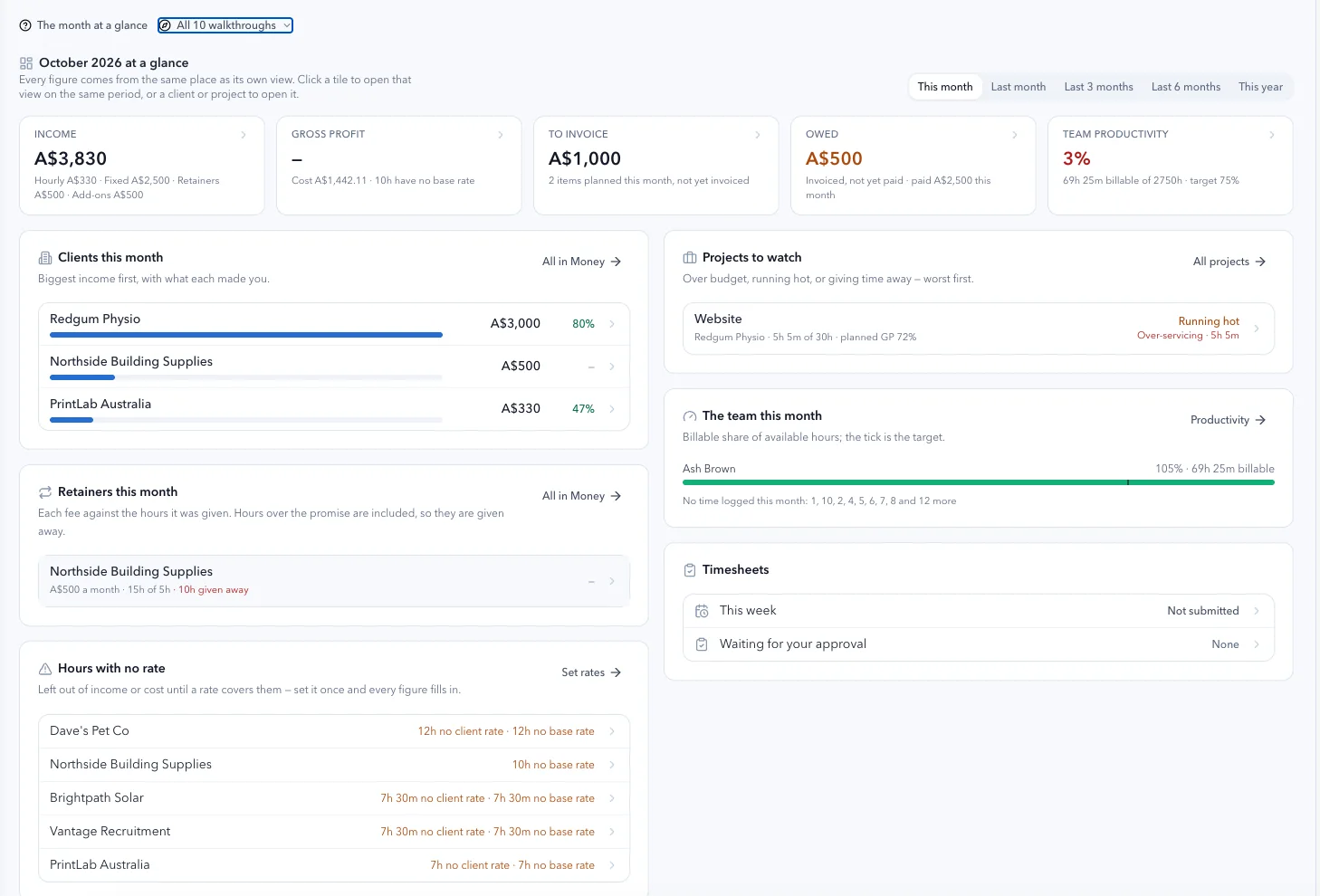
Every time tracker in this market links an hour to a client, or to a job code. That tells you where the hour went. GPS links it to the client goal it moved, which is a different question and a more useful one. Seventeen hours on an account is a fact you can do nothing with. Seventeen hours against a goal that moved four percent is a conversation this week.
Start the timer from anywhere, fill the week in one grid, or let a meeting record its own time. Each entry says which goal it was for and what kind of work it was, and the category decides whether it is billable, set once in settings rather than argued over entry by entry.
Over-servicing, while you can still do something about it
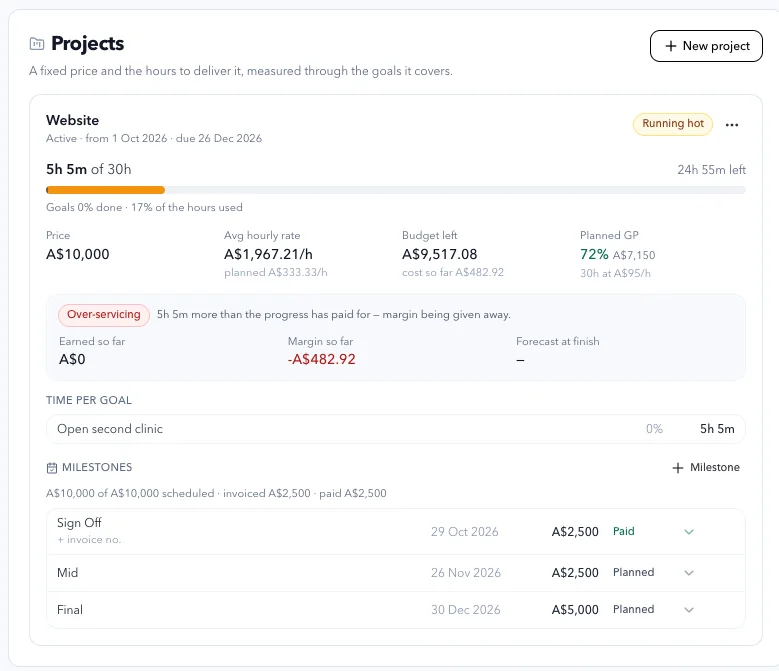
A fixed-price job carries a price and an hours budget, measured against the progress the goals have actually made rather than against the calendar. Run more than fifteen percent ahead of what that progress has paid for and GPS says so, in those words: five hours more than the progress has paid for, margin being given away.
It also carries planned gross profit from the day you price it, margin so far, and where the margin lands if the rest of the job goes the way the first part did. Not in July. Now, while the job is still open and the conversation is still worth having.
Numbers that will not flatter you
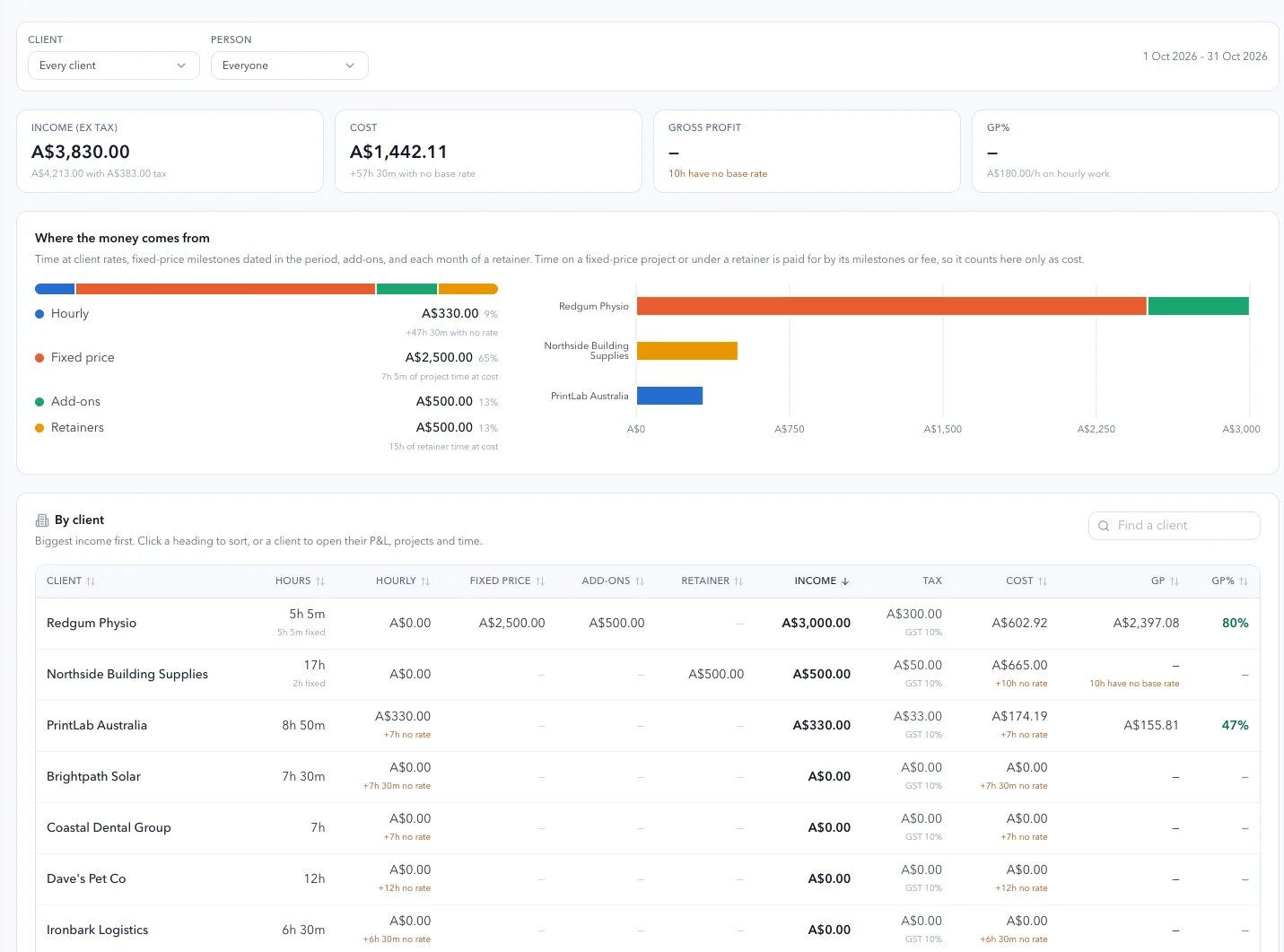
Where an hour has no rate on it, GPS counts it beside the figures rather than treating it as free, and withholds the gross profit instead of showing one that is too high. You get “ten hours have no base rate” where another tool would have given you a margin you would have believed.
Ask ANI what your gross profit is this month and it quotes the figure, or tells you it is being withheld and why. It will not estimate one, and it will not tell you it has invoiced anything. A month never looks better than it was, which is the only way a number is worth anything.
And the rest of what the money view holds
A profit and loss for every client
Revenue by source, direct costs including expenses, gross profit and GP%, month by month, with a CSV when you want one. Gross, before your own overheads. Yours alone: your team sees hours and the billing schedule, never the margin, and the client never sees any of it.
Retainers that stay the size you sold
A fee a month with hours promised against it. Hours over the promise show in red as given away, because that is what they are. Change a retainer and it changes from a month, so the months already billed keep the fee they had.
The billing schedule, invoiced where you invoice
GPS keeps what is due to invoice, what is owed and what is paid, across milestones, retainer months and add-ons, each with its invoice number. The invoice itself goes out of your own platform. Connect GPS and Ignition or Xero to the same AI assistant, ask it to draft them, confirm there, then mark them off here.
Premium is the product, not the price. The Practice plan is A$499 a month for 40 client accounts, which is A$12.47 per client account per month, with unlimited practice users and unlimited client users on every plan. Your whole team and every one of their people, inside it.
Make it relevant to your practice
Put a value on your next stage of growth.
Model recurring client revenue or the delivery time you could release. Adjust the assumptions to suit your services.
YOUR PRACTICE, YOUR POTENTIALWhat could your expertise earn?
Start with your client book and the service you want to deliver.
How to read this estimate
Illustrative inputs, not benchmarks. Switching currency changes the denomination, not the figures. Use the same tax basis for your fees and costs; Australian GPS prices include GST.
- Annual gross revenue
- $150,000
- GPS monthly subscription
- $149
- After GPS subscription, before delivery costs
- $12,351
Lowest monthly subscription for your client count: Solo. Every plan includes every feature; support levels differ.
Not a profit forecast. Excludes delivery labour, other overheads, acquisition costs, taxes and any one-off onboarding or migration fees. Assumes all entered clients pay the entered fee.
Your expertise. Your way of delivering.
How GPS fits the work you do.
Strategy consulting, advisory, coaching or ongoing client delivery: keep your method and give it a consistent place to run.
Take the strategy beyond the handover.
Turn the plan you deliver into owned actions and visible progress, creating a practical foundation for ongoing client reviews.
Explore GPS for strategy consultants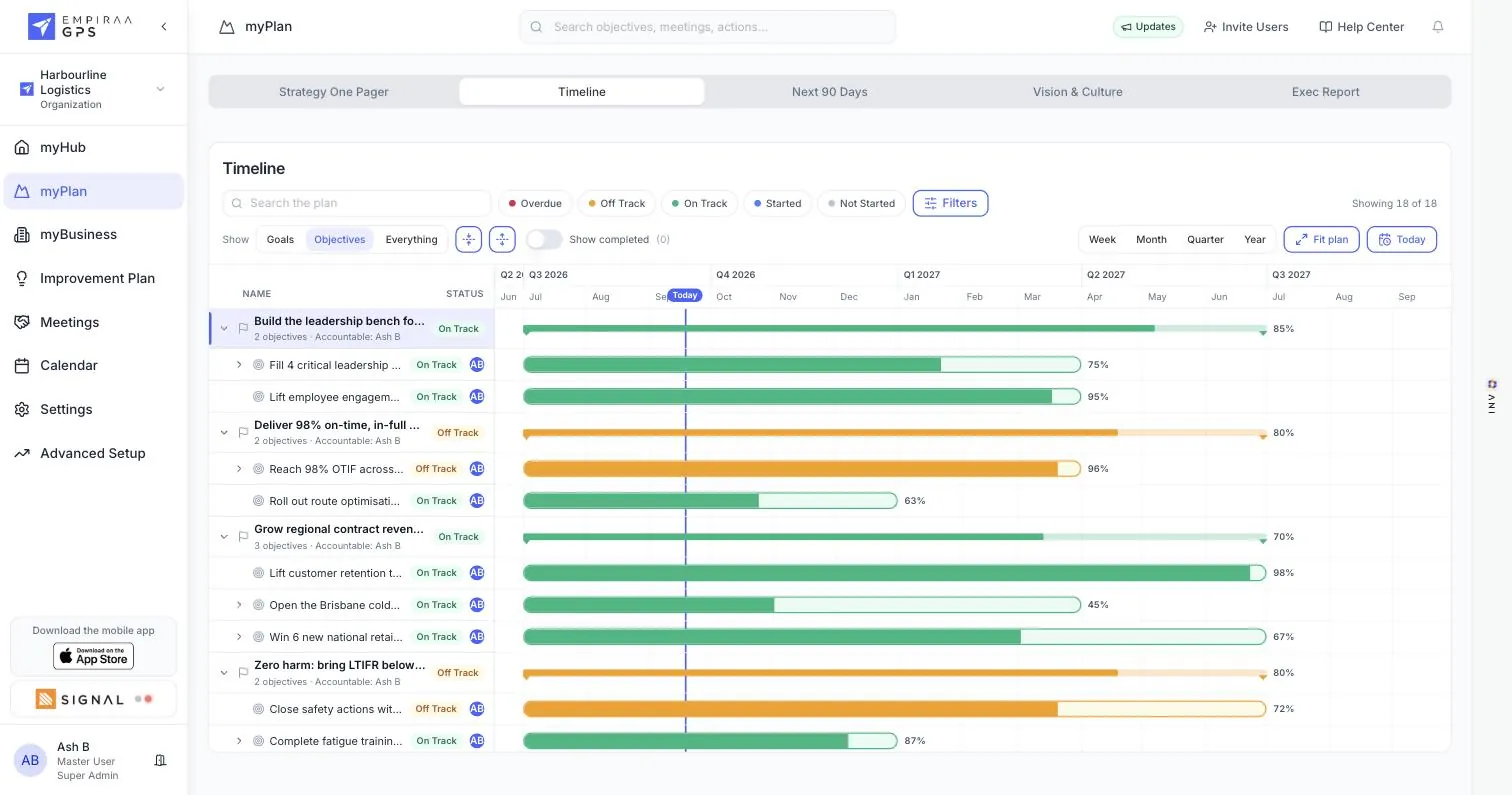
Explore GPS by profession
GPS for Strategy consultants
Turn the strategy you deliver into client-owned goals, actions and progress reporting, with a clear foundation for ongoing reviews.
GPS for Business advisory
Keep client priorities, meetings and accountability connected between advisory sessions, using a consistent delivery rhythm.
GPS for Accountants
Use ANI and ready-made templates to structure an advisory engagement, then connect client priorities to measures and regular reviews.
GPS for Virtual CFO
Connect financial measures to client priorities and prepare management conversations around progress, risks and next actions.
GPS for Business coaches
Track commitments and check-ins between coaching sessions so each conversation starts with the progress already in view.
GPS for Private equity
Oversee value creation plans across portfolio companies, with separate accounts and a consistent view of priorities and owners.
GPS for Venture capital
Give portfolio companies reusable planning structures and separate accounts that help founders turn guidance into action.
Before you begin
A clear path to your first client workspace.
What is Empiraa GPS for Professional Services?
Empiraa GPS is a strategy and client delivery platform that helps advisors and consultants manage client plans, demonstrate progress and grow recurring revenue. Each client has a separate account for plans, actions, meetings and reporting. myPortal gives your practice oversight across those accounts, with ANI and 220 templates supporting delivery.
Is GPS only for business advisory?
No. GPS supports strategy consulting, coaching, virtual CFO services, portfolio support and ongoing client delivery as well as advisory. Use it to turn your expertise into client plans, coordinate actions and meetings, and report on progress. Choose the templates and working rhythm that fit your service.
Can I use GPS if I am new to advisory?
Yes. Start with a relevant template and use ANI to help shape goals, objectives and actions. You bring your client knowledge, review the plan and agree the engagement. GPS provides the structure for delivery; your professional judgement guides the advice.
What is ANI, and what does it do?
ANI is the AI strategist built into GPS. It helps build plans, identifies priorities needing attention and drafts reports from workspace data for your review. It supports your work and does not replace your professional judgement.
Can I keep my own methodology?
Yes. Bring your existing plan or use ready-made templates. Your own plans and meeting agendas can be reused across engagements, with ANI defaults and client-specific settings.
What do my clients see?
Each client has a separate workspace for their plan, actions, meetings and progress. Unlimited client users are included. You can apply your logo, colours and typeface inside workspaces; clients sign in through Empiraa.
Does GPS replace my accounting or practice-management software?
GPS brings client planning and delivery together across consulting, strategy, advisory and coaching. Your accounting and practice-management systems retain their own roles. Native connections include Xero, Google Workspace, Microsoft 365 and HubSpot; check the relevant integration page for what each connection supports. Explore GPS integrations.
Can I bring existing client plans across?
Yes. Migration can include plans, KPIs, client lists and templates. Under Professional Services pricing, onboarding and migration are free on annual billing. Monthly plans have separate one-off fees. See the pricing page for the published terms. See Professional Services pricing.
What does the free pilot include?
The Professional Services pilot runs for 30 days on your chosen plan, with all features enabled. Nothing charged for 30 days. Cancel any time. A card is required, and it converts automatically unless you cancel.
Start with one client. Build a service you can repeat.
Try your next engagement with a 30-day free pilot on your chosen plan. Nothing charged for 30 days. Cancel any time. A card is required, and it converts automatically unless you cancel.
Card required. Converts automatically unless cancelled.
Paid plans from A$149/month including GST for 5 client workspaces. See plans and onboarding options →